
As cybersecurity threats continue to intensify, backup strategies no longer serve as an “insurance policy” against natural disasters or human errors. Instead, backup policies have become an essential defense strategy that determines whether an organization can continue to operate without issues in the face of a ransomware attack and sudden data loss.
Astra Security noted that, on average, a business somewhere in the world falls victim to a ransomware attack every 40 seconds. Interestingly, these attackers are no longer solely focusing on large enterprises. Small to mid-sized businesses, distributed units, retail outlets, and temporary sites are increasingly being hit by ransomware because they tend to have limited defenses.
Real-world scenarios highlight gaps in data protection
The truth is, many businesses are operating with fragmented backup infrastructure where backups might be overlooked even if it supports mission-critical applications.
For example, many companies have only one office and use backup infrastructure that does not meet standards, even though they still run core applications and file systems. These organizations often lack the backup and recovery capabilities needed to handle equipment failures or cyberattacks.
Enterprise data created for projects or temporary sites might be valuable, which means businesses are forced to choose between “not wanting to invest too much money” and “needing to protect essential data,” leading to a compromise rather than selecting the most comprehensive backup method.
For retail and multi-site organizations, data stored at a single location might be minuscule. However, as the number of sites grows over time, there are risks associated with distributed deployments and manual management. Backup configurations will be inconsistent, while admin control over data will be fragmented. Companies usually only discover issues after it is too late.
At the same time, many organizations do not yet require large-scale backup architectures. But it is important to keep in mind that all businesses face the same threats: ransomware attacks, data corruption, and operational disruption.
Click here to learn more.
Real-world deployment scenarios with ActiveProtect
As deployment environments become increasingly diverse, companies need to implement a comprehensive, all-in-one backup solution that meets a wide range of data protection requirements.
Meet Synology ActiveProtect, a purpose-built backup appliance that secures your on-prem and cloud data with built-in capabilities such as data deduplication, backup creation and storage, and instant restoration. These allow companies to fortify their backup strategy by following the 3-2-1-1-0 policy, empowering organizations to unify their backup architecture and backup and recovery standards.
As organizations vary in IT resources, scale, and deployment requirements, Synology ActiveProtect offers a wide range of appliances, from desktop to rackmount servers, so that businesses can choose the perfect appliance for their current data needs and performance requirements, and scale as they grow.
Click here to learn more.
Small offices and branch offices are still at risk
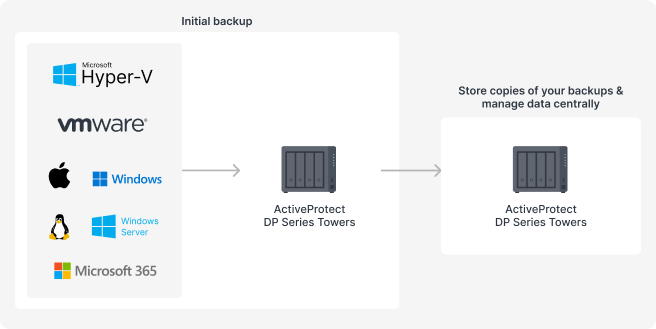
Small or branch offices might think they don’t need large rackmount models as they don’t have that much data. However, they may not realize that they still face the same risks as larger offices—ransomware attacks and data loss.
In this case, ActiveProtect DP Series Towers are ideal for performing local backups and enabling businesses to recover data quickly. The backup copy mechanism in ActiveProtect Manager allows companies to replicate and store copies of their data at a separate branch location or at HQ. This is a simple yet effective way to create a disaster recovery architecture.
Temporary site offices come with risks related to data security
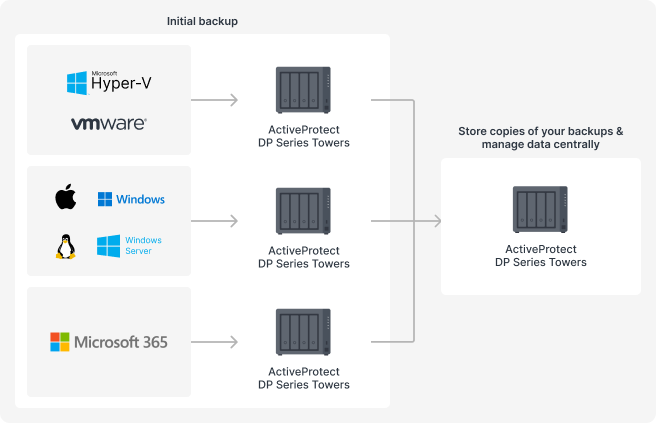
Even though temporary site offices might not be there for a long period of time, data generated during this time period is still important. Not only is losing valuable data a loss for IT, but it can also affect the entire project, from timelines to accountability.
In this case, ActiveProtect DP Series Towers can be deployed on-site as a real-time backup server, storing data locally while backups are regularly replicated to the cloud. At the same time, businesses can unify their backup management across sites via an ActiveProtect DP Series Tower or rackmount server and set up role-based access controls.
Why small and mid-sized businesses also need modern backup solutions
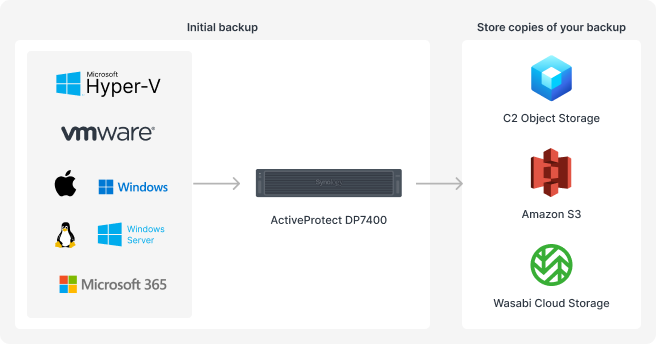
Many small and mid-sized enterprises operate from a single office space that hosts core applications and a large number of files, even though it may not meet data center standards. If there is no off-site data center, these could all be easily impacted by a ransomware attack, equipment failure, or accidental deletion, leaving an organization with no second line of defense.
In this case, ActiveProtect DP7400 can be deployed to safeguard critical applications centrally. Using ActiveProtect Manager’s Copy mechanism, backups can be replicated to cloud object storage services such as AWS S3, C2 Object Storage, or Wasabi Cloud Storage, ensuring businesses have an effective off-site backup strategy.
Inconsistent data protection across retail and chain stores
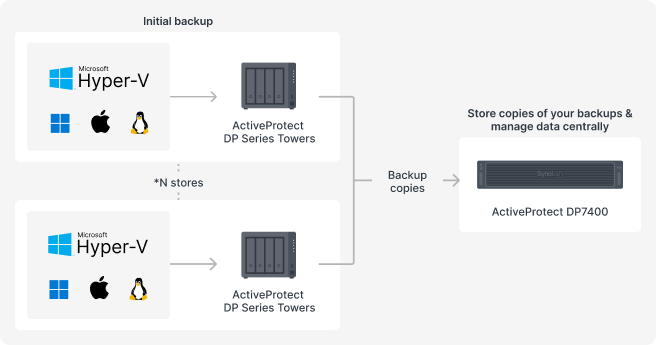
Even though retail stores and chain stores might not generate large amounts of data at each store, data such as POS systems, transaction records, and operational data are highly fragmented. As the number of locations increases, manually managing your backups can lead to security issues or gaps due to inconsistent backup configurations or human oversight.
In this case, ActiveProtect DP Series Towers, such as DP320 or DP340, are recommended to provide local protection for retail data. At the same time, data can be replicated to a central DP7400 located at HQ to unify data management and monitoring.
Scale from desktop to rackmount servers to the cloud as your business grows
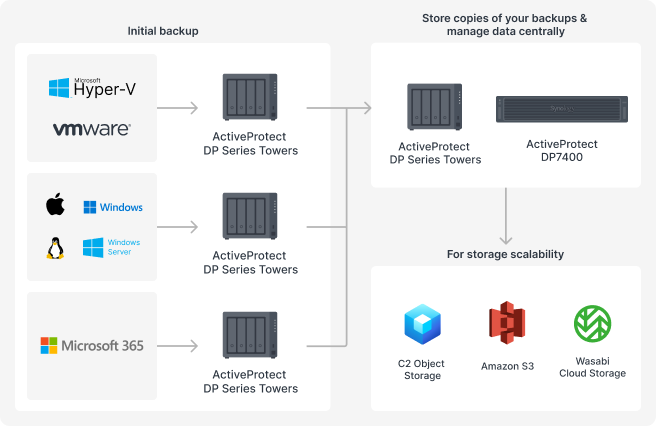
As your business grows, your backups should be flexible and scalable so that you don’t need to revamp your entire backup architecture. With Synology ActiveProtect, companies can introduce high-performance rackmount servers or cloud solutions into their existing infrastructure over time.
Consolidate core workloads in the data center while original ActiveProtect DP Series tower deployments continue to safeguard data produced in branch offices and edge locations, creating a multi-layered approach to data protection.
Another thing to note is that backup systems must accommodate long-term data retention and cost management requirements. With ActiveProtect Manager’s data tiering capabilities, organizations can automatically move data to remote storage options such as Wasabi Cloud Storage, AWS S3, or C2 Object Storage based on their retention period and access frequency. This would allow companies to meet RTO requirements while reducing storage costs.
Conclusion
With Synology ActiveProtect’s central management architecture, IT teams are empowered to monitor backups across all locations and apply consistent backup and retention policies, ensuring uniform data protection across all sites and appliances and serving as a foundation for business growth as they scale.
As ransomware is a very real risk in today’s world, the 3-2-1-1-0 backup strategy is not just a suggestion; it is a benchmark that organizations need to achieve, regardless of their size, to recover data quickly when faced with sudden data loss and ensure continued business operations.
Synology ActiveProtect rises to the challenge, enabling businesses of all sizes and deployment scenarios to implement an effective, resilient data protection strategy that addresses current and future cybersecurity threats and business needs.
Click here to learn more about Synology ActiveProtect.