
AI assistants have quietly become part of the default workday. They draft replies, summarize long email threads, translate content for global teams, and turn rough notes into something you’d actually send. But “which model is best?” is surprisingly hard to answer in a way that reflects real work. Brand perception, UI differences, and one bad interaction can skew opinions fast.
So we ran a small internal experiment. Over four weeks, Synology employees around the world used AI features inside Synology Office and MailPlus, our Synology Office Suite that lets organizations connect their own choice of LLM while keeping content private through a de-identification layer. Participants were randomly assigned one of four leading models each week (Claude, Gemini, GPT, or Grok) and the test was blind: nobody knew which model they were using.
We intentionally avoided turning this into a lab benchmark as we wanted real feedback from day-to-day activities. So quick disclaimer: the prompts weren’t standardized and tasks weren’t controlled. People did however do real work, such as improving email drafts, checking grammar in their reports, translating sales decks, and much more. Then they answered a short weekly survey. Across the four weeks, we collected 147 responses that spanned dozens of teams.
What we found
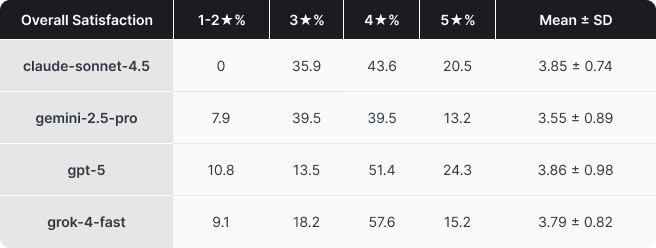
The top three are very close. Claude, Grok, and GPT clustered within a few hundredths of a point on our composite quality score. As expected for frontier LLMs, the differences will be relatively minor. What’s more interesting is that while GPT did edge out Claude in the final score by a hair, it received considerably more negative feedback.
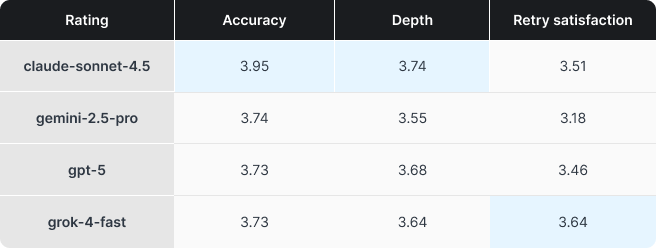
Model strengths are clearer than the overall ranking. Claude led on Accuracy and Depth, a strong profile for work where correctness and explanation matter most. Grok stood out on what we called Retry satisfaction, which can also be understood as the model’s ability to follow instructions. That matters because constant back-and-forth is one of the fastest ways to turn an assistant from helpful to frustrating. Gemini didn’t excel in any particular metric, though this is likely due to it being the oldest in this test (Gemini 3 wasn’t available when we started the test). Again, this wasn’t meant to be a scientific test, but the results were interesting nonetheless.
Where friction showed up
The qualitative feedback and comments we received painted a consistent picture of what actually slows people down:
-
Poor instruction following, too many turns to land the right tone, structure, and correctness
-
Answers that were technically fine but too long or conservative, creating extra work and reducing the amount of time actually saved
-
Context discipline problems, where the model made assumptions from (incorrect) context (e.g. failing to understand a meeting was changed from one time to another in a subsequent email thread)
It’s difficult to quantitatively give some of these things a score, but they’re exactly what determines whether an assistant feels like a time-saver or a gimmick. Even in a blind rotation, consistent behavioral differences came through.
Some models produced longer first drafts by default despite prompting to be concise, a drag in writing and email workflows where short and clear messages matter more. Some leaned toward safer, more hedged answers in ambiguous situations, reducing the chances the model says something controversial or potentially incorrect, but frustrating users who wanted a clear recommendation or statement.
Cost
Another reason we ran this pilot is that it’s actually hard to predict actual pricing. Token usage behavior varies meaningfully across models, and real-world cost can diverge quickly from what you’d predict by looking at per-token rates alone.
In our usage logs, we saw clear differences in how token-efficient each model ran, even when using the exact same prompt and reference files. Our tests ran with reasoning mostly disabled or set to the minimum amount possible, but the way a model works can still vary dramatically, especially due to how LLMs are inherently non-deterministic.
We ran a separate bite-sized test to evaluate efficiency, but the results were in-line with our main organization-wide one. Simply put, pricing and efficiency vary by a not insignificant amount. While Claude generally received the best feedback, we’ll have to ask ourselves if it is worth >2x the price over Gemini or GPT? And it doesn’t feel fair to even add Grok to the comparison.
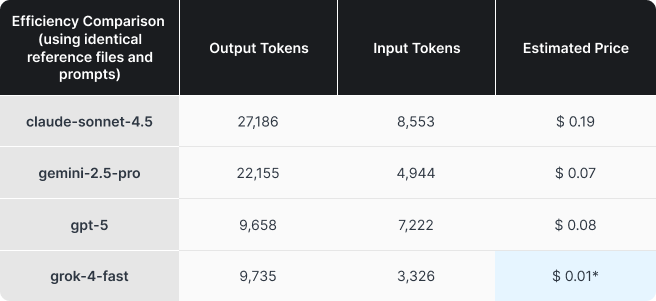
*Rounded up
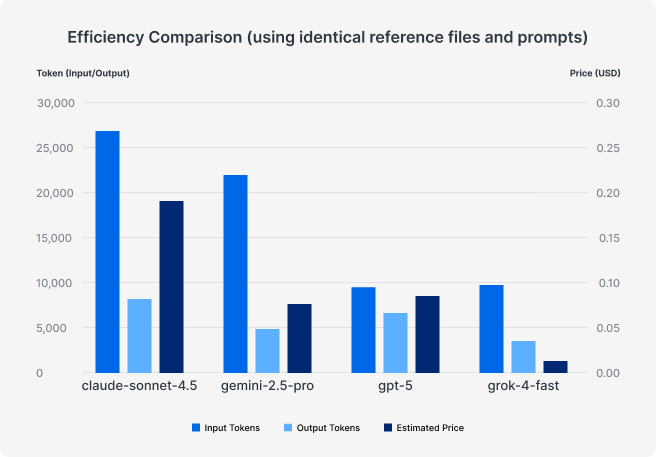
The practical takeaway: Costs can vary dramatically. Just like working with IT vendors, it’s important to monitor and regularly check the quality versus costs of the services you use. AI models are currently improving at breakneck speed, making it even more important and beneficial to keep up.
What this means for companies deploying AI
The main conclusion is straightforward: AI isn’t set-and-forget. Our test ran for just four weeks, and even in that window, providers shipped significant updates that changed behavior, quality, and cost. If you’re deploying AI into core workflows, you need a lightweight framework to keep checking whether your assumptions still hold for your environment.
AI already shows real promise for routine knowledge work, especially writing, summarization, and translation. What matters most are the number of retries, accuracy, and whether employees feel confident enough to ship the draft with minimal edits to actually realize time savings.
Finally, it’s worth noting what made this kind of evaluation possible: we ran the pilot inside Synology Office and MailPlus, with our de-identification layer active between user content and the model provider. Business productivity depends on much more than just the LLM, but also in choosing a system that integrates with your employee’s workflow and complies with the company’s data security policies. This is the core of Synology AI Console, a platform designed to help organizations evolve alongside the AI ecosystem while keeping their data secure.
Ready to bridge the gap between AI-driven productivity and data security?