

As organizations accelerate their digital transformation, more business-critical workloads are being stored in public cloud platforms such as Microsoft Azure and Amazon Web Services (AWS). While public cloud providers offer built-in backup services, relying exclusively on cloud-based protection may not meet every organization’s requirements for isolation, data control, and flexible restoration.
An independent on-premises backup can complement cloud-native protection by providing an additional recovery option and giving organizations greater control over their backup infrastructure.
The case for local backups in the cloud era
A reliable backup strategy goes beyond simply having a copy of your data. Where that copy is stored and how it can be accessed and used are equally important. This is where local backups offer an advantage:
- Strengthen backup isolation: Keeping an independent on-premises backup copy helps reduce the risk of a compromised cloud account affecting both production workloads and recovery data.
- Maintain data sovereignty and compliance: For regulated industries such as healthcare or finance, organizations may need to meet strict requirements governing where backup data is stored and who can access it. Storing backups on-premises gives organizations greater control over where their data is stored, who can access it, and how long it is retained.
- Expand recovery and workload mobility options: Restore supported cloud workloads to on-premises virtualization environments for disaster recovery, workload migration, or testing. This reduces dependence on a single infrastructure platform.
You might expect backing up cloud workloads to on-premises platforms to cost more than native cloud backups, given data egress fees and the compute resources used during backups. In reality, local backup can be very cost-effective, depending on the solution you choose.
ActiveProtect: Cost-efficient cloud-to-local backup solution

Synology ActiveProtect is an all-in-one backup appliance, providing agentless backups for Microsoft Azure VMs and AWS EC2 instances. In addition to these cloud platforms, ActiveProtect supports a wide range of other workloads. Click here to learn more.
Save 67% over five years vs. native cloud backups
ActiveProtect delivers a return on investment (ROI) within the first year and costs 50% to 67% less than Azure Backup or AWS Backup over five years, appliance included.
The difference comes down to each solution’s pricing model. Native backup services charge monthly for every gigabyte retained in the cloud. Azure Backup also charges per protected VM without deduplicating backup data. ActiveProtect is a one-time appliance purchase; after that, you only pay for deduplicated data leaving the cloud and short-lived worker instances.
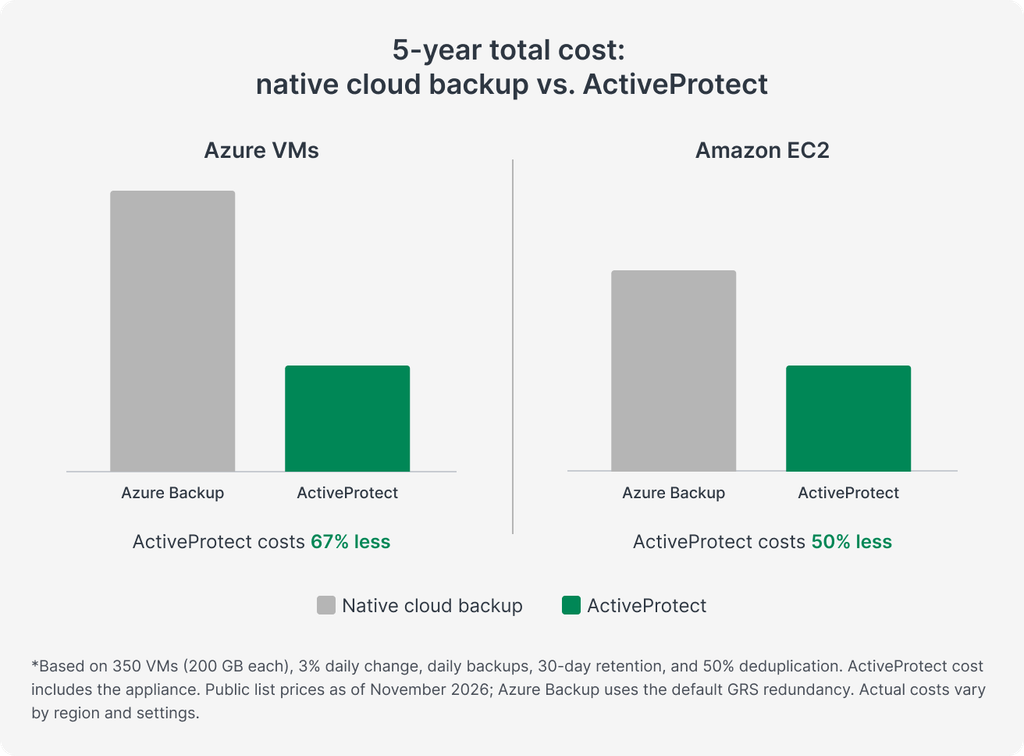
These savings are made possible by a combination of technologies in ActiveProtect that reduce data transfer and processing costs, making cloud-to-local backup more cost-effective.
Reduce data egress fees with SURE technology
Data egress is often one of the largest cost drivers when backing up cloud workloads. The more data transferred out of the cloud, the higher the potential charges.
ActiveProtect addresses this challenge with SURE (Synology Unified Reduction Engine), a proprietary technology that combines incremental backups with source-side deduplication to minimize data transfers from the cloud.
When a backup begins, ActiveProtect automatically launches a temporary worker instance in the cloud to retrieve and deduplicate backup data before transferring it on-premises. By transferring only data blocks that are not already stored in the backup repository, ActiveProtect reduces bandwidth consumption and cloud egress fees while improving backup efficiency.
Optimize transfer costs with private routing
Beyond reducing the amount of data transferred, organizations can further optimize cloud-to-local backup costs by choosing how that data travels.
By default, ActiveProtect connects to the cloud worker instance through its public IP address. However, organizations can easily enable private routing with just one click, directing backup traffic through existing Site-to-Site VPN connections or dedicated connections such as AWS Direct Connect and Azure ExpressRoute. This allows organizations to leverage their existing network infrastructure and potentially reduce data transfer costs, depending on their connectivity setup and cloud provider pricing.
Minimize compute costs with on-demand worker instances
Cloud computing resources are billed by usage, so worker instance runtime also affects costs. ActiveProtect launches worker instances only when a backup or restore task starts and removes them as soon as it is completed, so organizations pay for compute resources only during data protection operations.
Beyond cost savings: Secure & flexible data protection
Reducing cloud backup costs is important, but organizations must also ensure that their data remains secure, manageable, and recoverable. This is where ActiveProtect excels.
Strengthen backup security with immutable and air-gapped protection
Moving data outside the production cloud environment creates an additional layer of protection. First, ActiveProtect provides immutable backup protection through Write Once, Read Many (WORM) technology, helping prevent backups from being altered or deleted during their configured retention periods.
For additional isolation, ActiveProtect also offers air-gapping with multiple levels of isolation, allowing organizations to isolate backup systems by disabling network connectivity or powering off backup appliances entirely outside scheduled backup windows.
Together, these capabilities help organizations establish more resilient backup architectures and protect backups against ransomware.
Maintain data sovereignty with full backup control
With ActiveProtect, organizations can keep cloud data on infrastructure they own and manage, maintaining direct control over where backup data resides.
ActiveProtect further strengthens this with storage encryption that allows organizations to retain exclusive control over their encryption keys, granular role-based access control (RBAC), and comprehensive audit logs. These capabilities help organizations maintain data sovereignty, even as their production workloads move to the cloud.
Enable greater data mobility with cross-platform restoration
Cloud adoption does not remove the need to bring workloads back on-premises. Organizations may need to restore cloud workloads locally for data analytics, testing, or development.
ActiveProtect supports cross-platform restoration between public cloud workloads and supported on-premises environments, including VMware, Hyper-V, Nutanix AHV, and Proxmox VE. By removing platform boundaries, organizations can move workloads between environments without rebuilding them from scratch. This reduces migration complexity and enables greater flexibility in how data and infrastructure are used.
This flexibility helps organizations avoid vendor lock-in and adapt their IT infrastructure to changing business needs, without being limited by their original deployment environment.